I think that is this is possible and I hope to show you why
I’ve fallen into the self-hosted AI rabbit hole and I’m inspired to make something out of it. Other people have gotten everything working locally but I want to go a step further. I want to stream the AI’s responses as audio over the internet. It will connect to my server that is running the chatbot and stream the result back to the raspberry pi in the drone. This is my most ambitious project yet and will take a lot more learning to complete. I’m willing to put in that time!
What this project is about:
I want to build a robotics platform that will carry me through the rest of my college career. It will be a dual-rotor fully enclosed drone capable of displaying emotion and chatting with me. I will be able to talk with it in normal conversation and ask it technical questions. The processing for the AI models are all handled on my server and streamed back to the drone. The single eye on the front is made from an LED matrix and will display 45’s emotional state. The two microphones will allow 45 to detect where the speaker is and turn to face them. Later the two cameras will make this more precise but audio detection alone will work for the initial demo. There will be a third microphone on the back to detect louder noises so the drone can turn around.
The audio streamed from the raspberry pi will be fed through three AI models:
speech to text
text as prompt to chatbot
chatbot response to speech
This audio will then be streamed back to the drone to be played on its speakers. I have 4 laser range sensors to ensure 45 knows where obstacles are. The MPU6050 gyroscope ensures that 45 doesn’t drift or rotate its rotor bar too far. I started this project less than two weeks ago so I think that I’m making good progress.
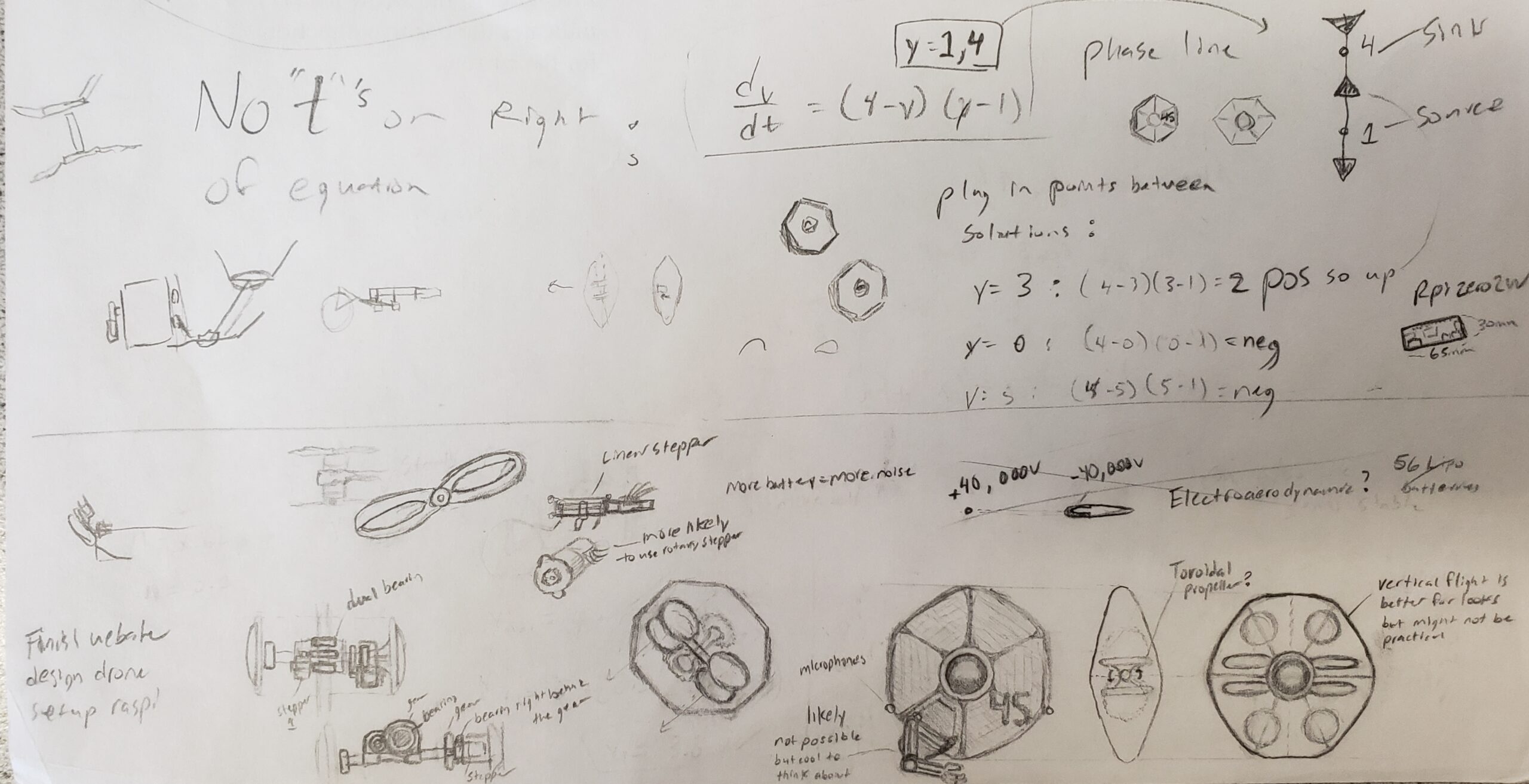
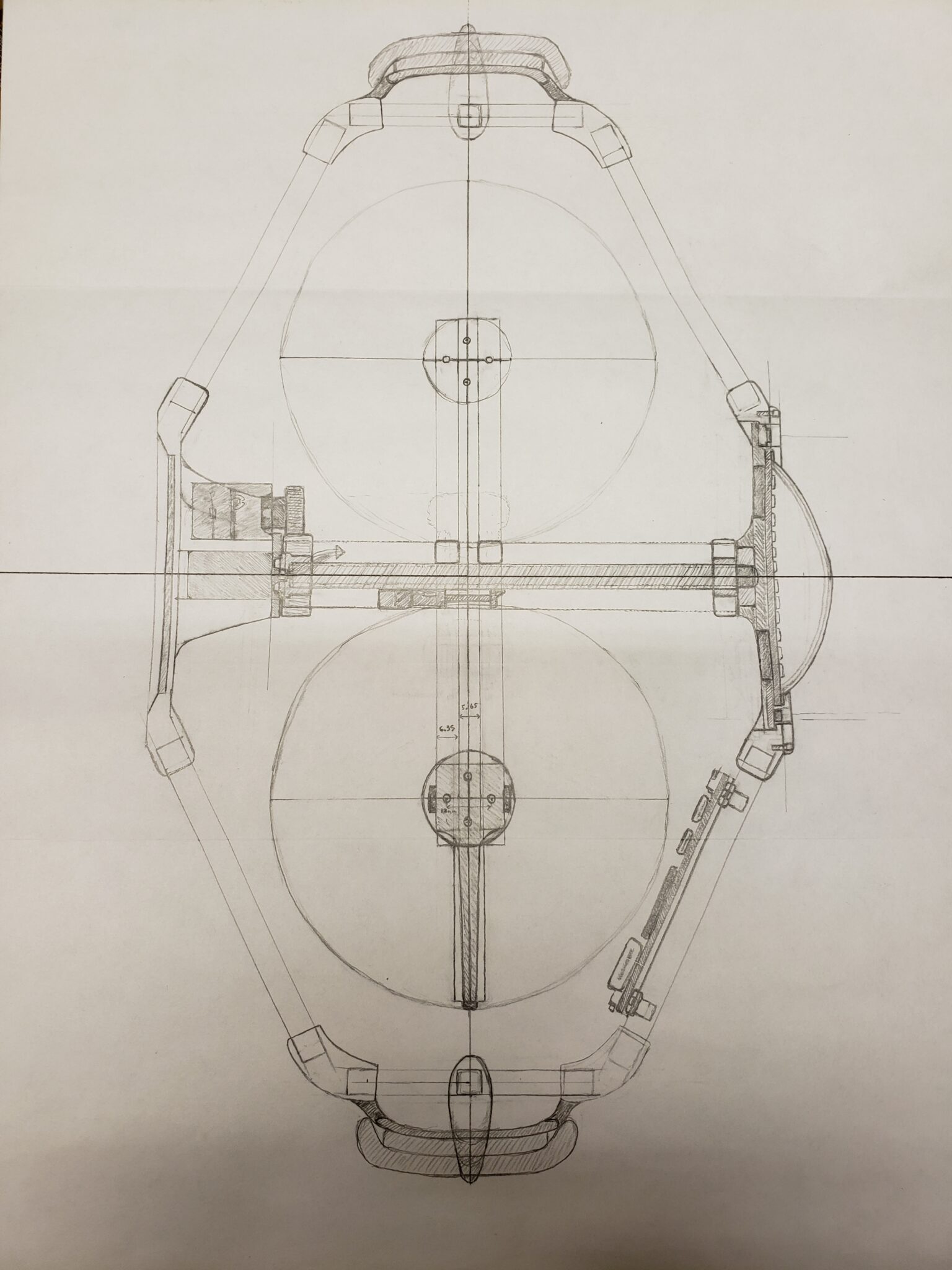
My First Concept Art!
These posts are meant to update
They are supposed to be closer to an image gallery then a tutorial
Building the Tile will take a lot of effort so these posts will be more hands off. Expect and introduction, many images with captions, and then a conclusion with a summary of next steps.
I was trying to visualize the physical design here. Many of these mechanisms have changed
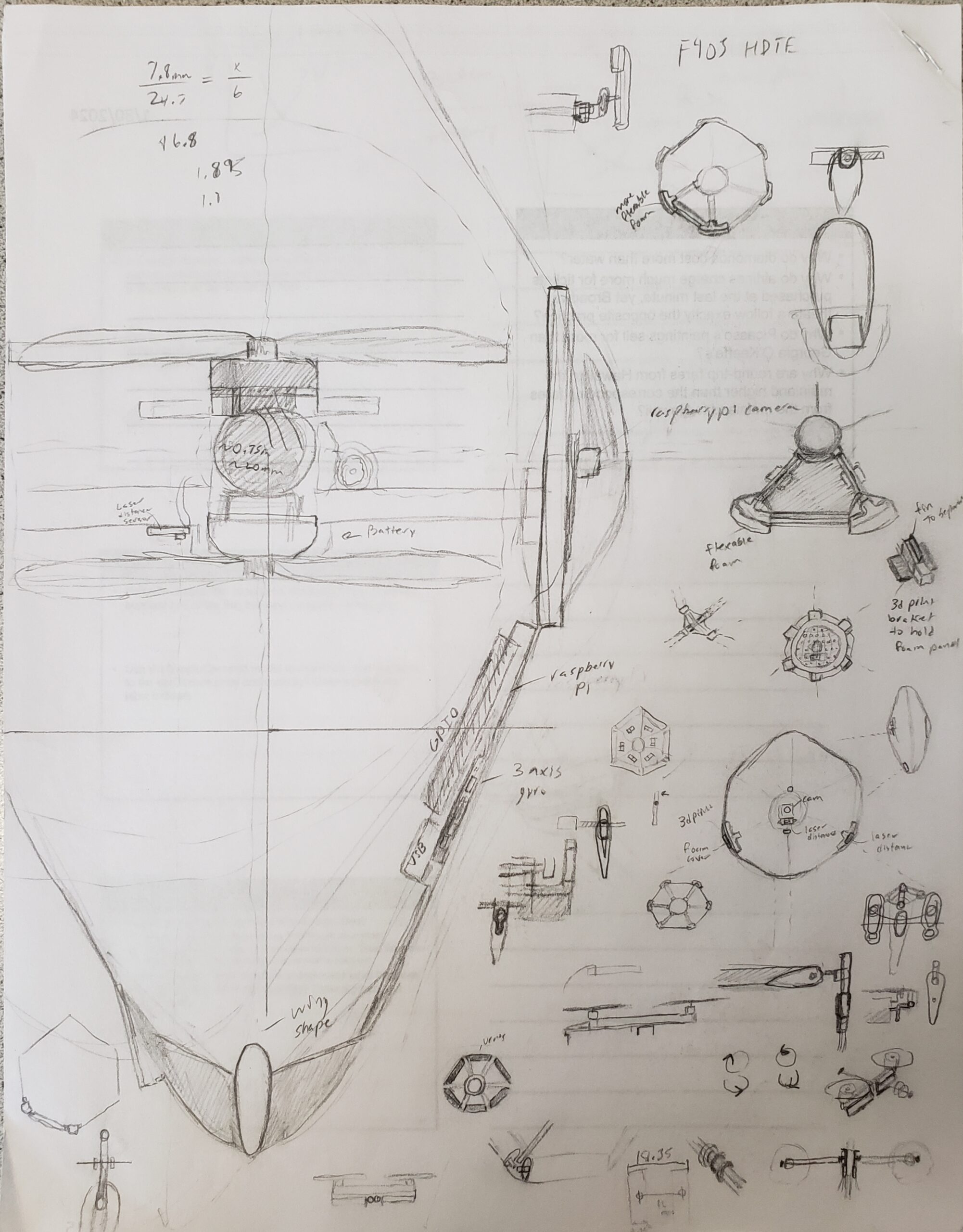
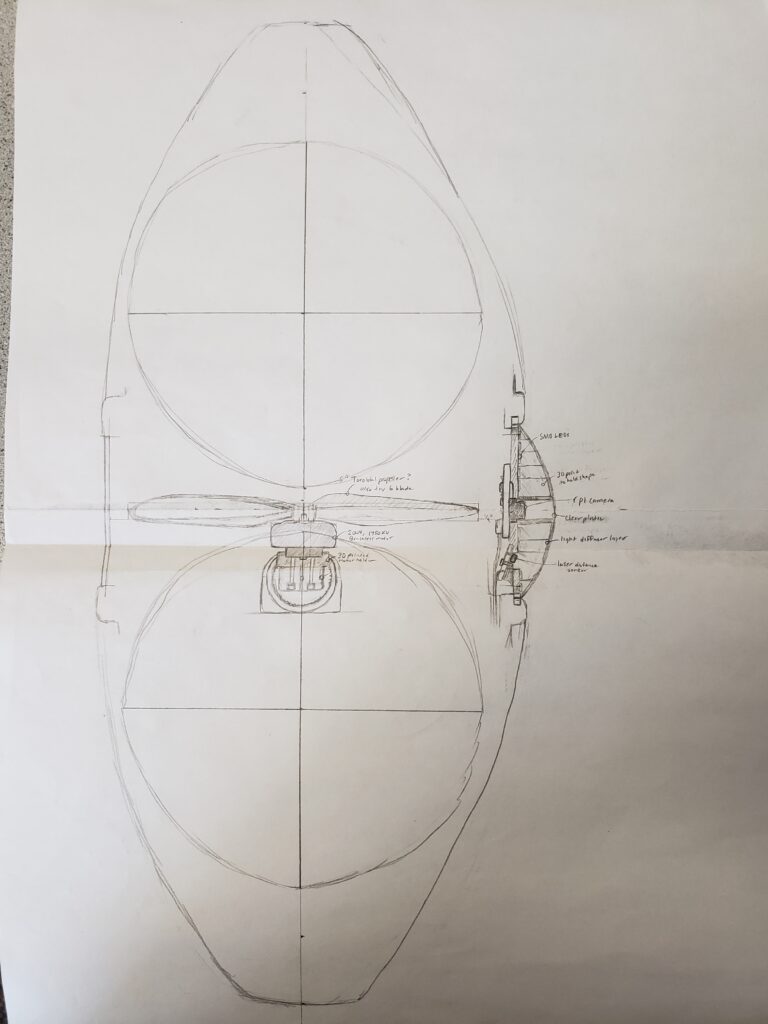
This is an older design with 5" props. I decided it was too large so I went to 4" props.
The rotor placement was incorrect here so I needed to redraft
The stepper placement here blocked the rotor.
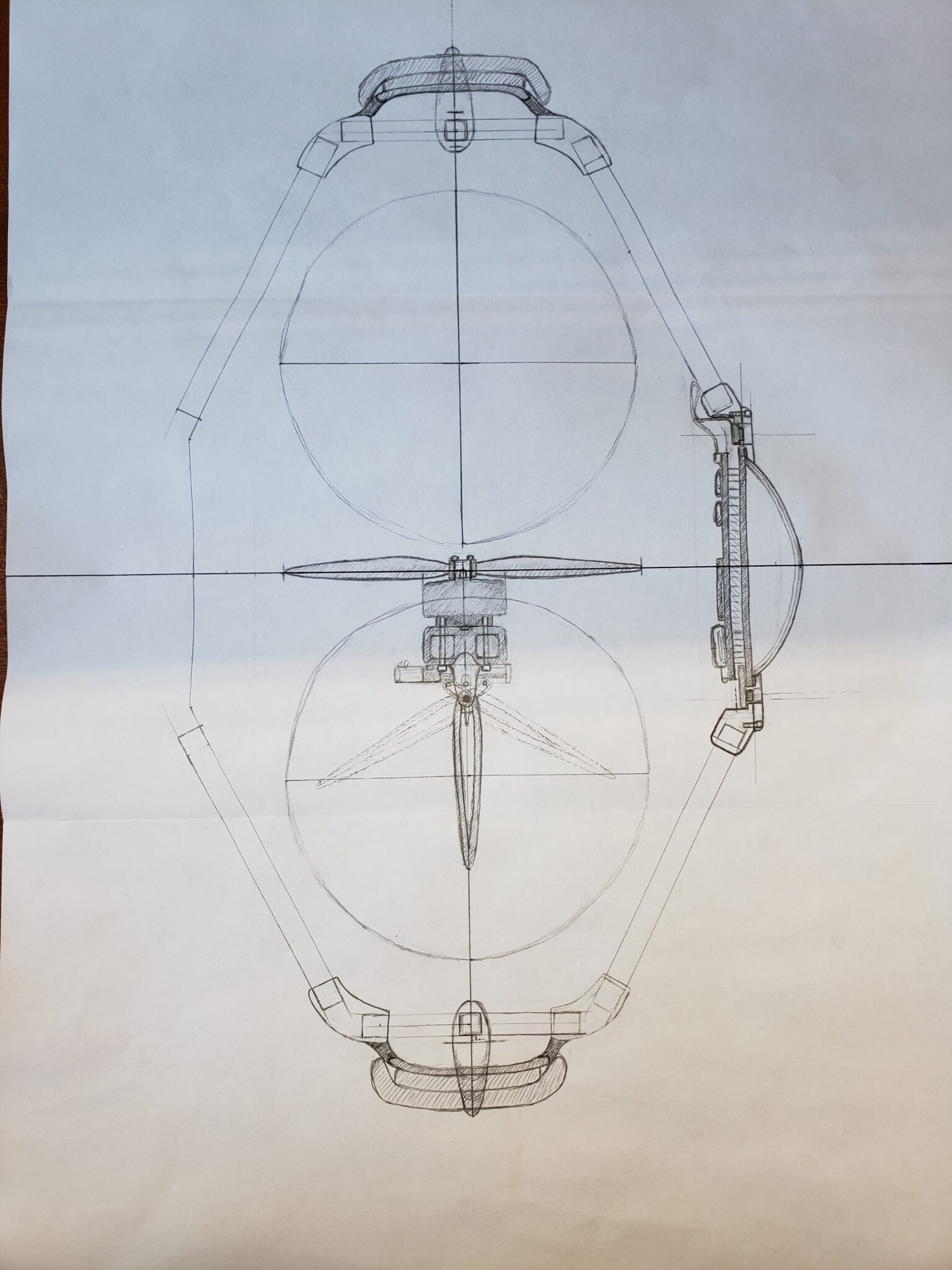
The more finalized design of the side/top view with side panels drawn in
I have 18 channels in my slip contact so I had to optimize. I also show the control surfaces here
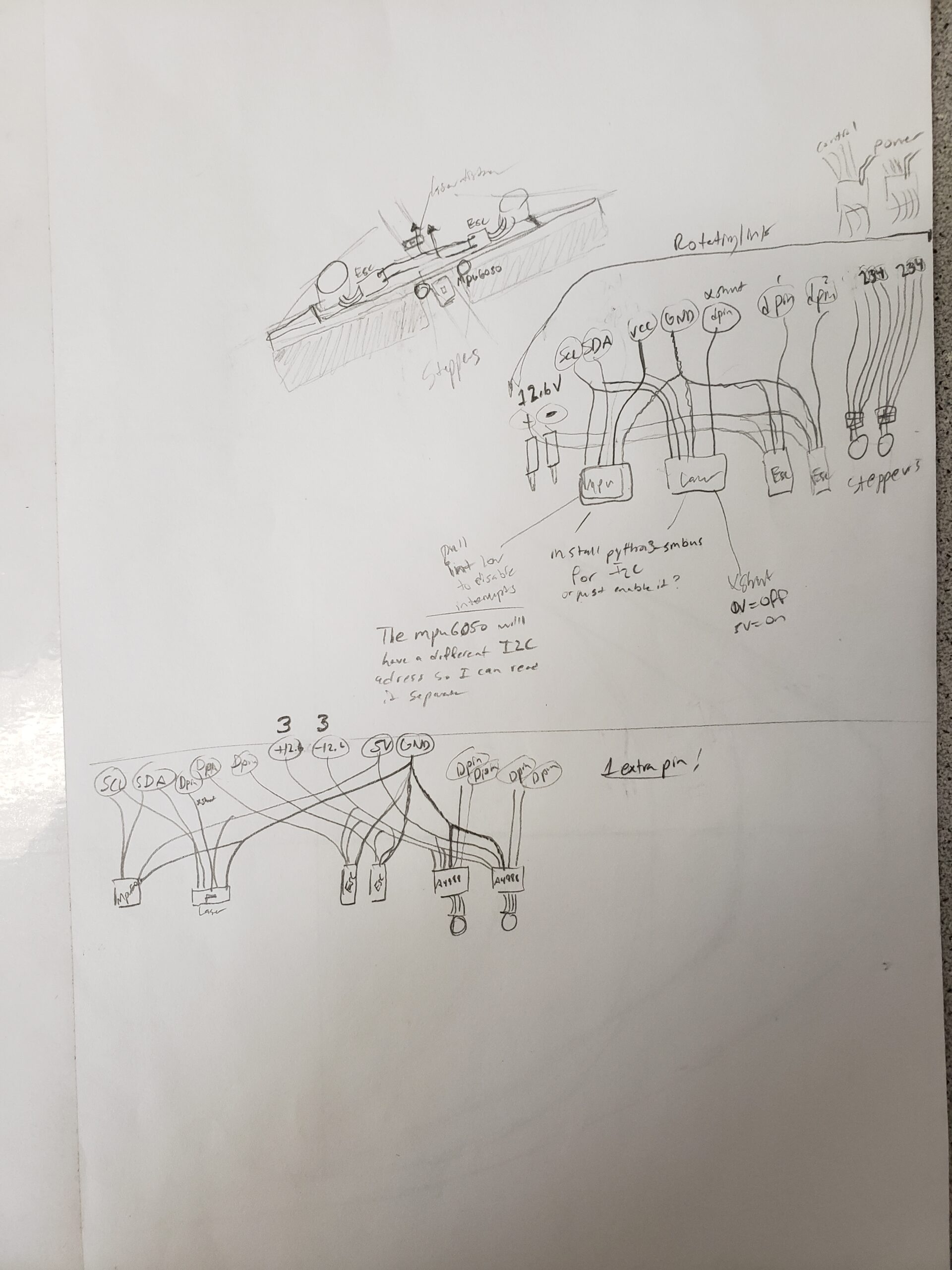
Tile Wiring Diagram
I made the full wiring diagram beforehand to make sure this is possible
I researched each of these components and made sure I knew how to wire and use them before implementing them. I wasn’t sure if the Raspberry Pi 3A+ had enough pins and interfaces but I2C came to the rescue! Each I2C device has a different address (unless I’m using multiple of the same sensor) so it is easy to get data from each sensor connected to the Pi’s interface. I just disable the other laser sensors when I don’t want to read from them. Most of the harder devices are handled by USB so this makes it easy to integrate with OpenCV and PyAudio in the future.
I will need to make a custom LED matrix PCB by the due date but I can leave the charging pads for later. I have a 3S battery on the way but I might upgrade to a 6S if I get the chance/funding.
Full* Tile Programming Outline
The image recognition won’t be working by the demo date but the rest is feasible
I’ve mapped out the Drone Control Loop and the Speech-Speech programs. Spitting the tasks into three stages like this helps make the complicated functionality clear and attainable.
The Control Loop mainly consists of keeping the drone in a hovering state until it needs to land. The eye is a very important part of this section because it provides the main visual appeal of the drone. The LLM won’t know that it is on a drone so all the control and emotional display will need to be handled by hardcoding random functions in the control loop. It may be possible to base the emotion displayed off the AI’s text output but time will tell if this is feasible.
The Speech-Speech program is where most of the complexity for the demo will be concentrated. I will need to send audio to from the server which will take some coordination. I plan to use a hot-spot on my phone to provide the internet connection to my raspberry pi. This will allow the robot to function anywhere without interruption. There are three AI models in this section alone and they all need to work together.
Bill of Material
I’ve invested a lot of my own time and money into this project already
I really want to have a working prototype for a design project presentation coming up. I ordered everything ahead of time to make sure I have the most time possible to start building it.
Demo for my Presentation
I really wanted to have the speech to text working for the presentation but this was enough
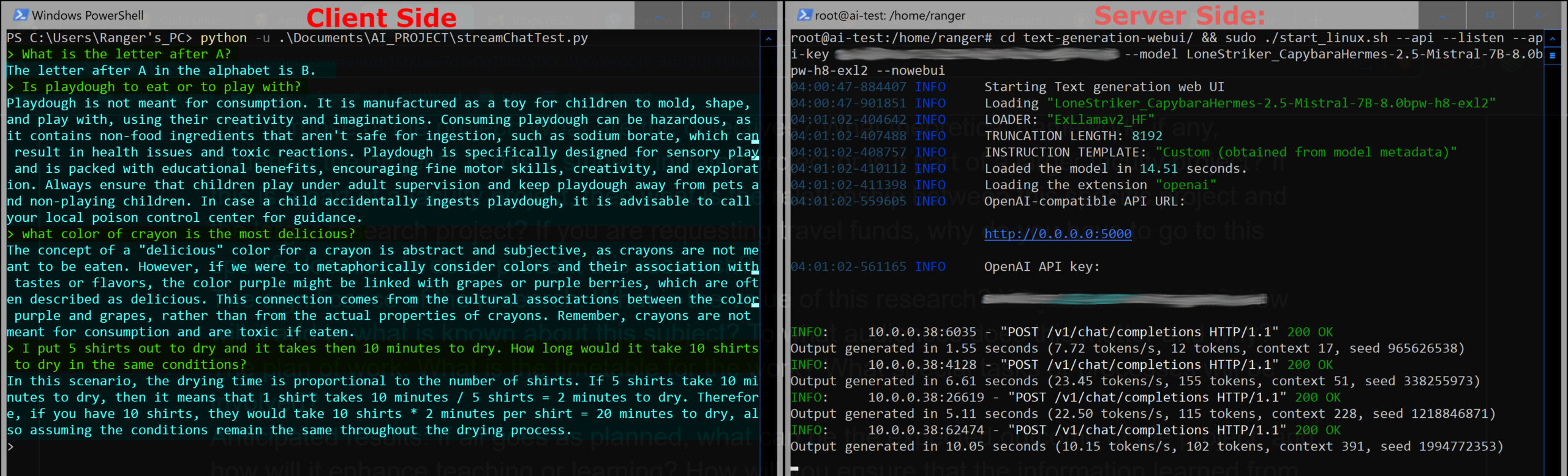
I found that my GPU didn’t have tensor cores which prevented me from running the speech to text “Whisper” model I was planning on using. I was able to get it running on my CPU but the quality was poor and the compute time was too high. I decided to just demo the chatbot working at school. I started the server and was able to connect to it from campus using a Python script. This allowed me to stream the chatbot’s response in real time to my laptop at school. I’ve shown an example of this script working below. The left side shows the prompts and responses I get back from the server. The left side shows the server starting and receiving the prompts. I can get 23.45 tokens a second which is fast enough to hold a conversation. On the Client side you can see my humorous prompts to the AI in green and the response from the server is in blue. It gets the last tick question I ask wrong which tends to be a limitation of the smaller AI models. Running a larger smarter model might help with hard questions but it takes more time to compute. If I had a faster GPU then I could run smarter models with enough speed to be useful in a verbal conversation.
This is the demo I gave during my presentation
Future Plans
Over spring break I will continue to post updates on the progress
I will go to Hobby Lobby and get the balsa wood and foam board I need to start building the tile over break. The physical drawing is to scale so that will make the 3D modeling easier. I’ll prototype and build the tile over break and hopefully have it programmed by the final presentation date for “ECE-212-B: The Design Process for ECE”, which is apparently secret? I know that it is sometime in April.
Hi Ranger,
This is very cool and Val and I are impressed! One question, are the props quiet enough for effective voice communication? I assume you have counter rotating props for stability, I hope they are slow and quiet enough that you can talk to it without shouting. I think you will need highly directional microphones located as far from motors and props as possible. Noise cancellation? Since the mikes are directional, you may need an array of them, or perhaps the drone will be clever enough to keep the mike pointed at you all the time.
We looked at the Valpo U catalog, is this really a one-credit course? That seems unfair for such a big project. Any chance of bringing in a few classmates to assume responsibility for parts of the project, with one credit for each of you? You would function as lead project engineer working with a team. This is how projects get done in the real world! Of course, you need mates who will deliver excellence with a high degree of autonomy and deliver on time, otherwise the team approach could be harder to pull off than doing the work yourself!
All the best,
Robert Bartlett (Meng EE Cornell U ’83)
RG Bartlett LLC
Chatham VA
Glad you like the project! It’s something I’ve been thinking about a lot. Noise was a big design consideration for me. I’ve looked into 5, 6, 8 blade propellers and even more exotic props like MIT’s toroidal propellers. I was originally considering Ion-propulsion but that isn’t practical for many reasons (40,000V requirement, ~56LiPo cells, etc). I settled on 6 blade 4″ propellers because they fit well into the design and the extra blade count should reduce the RPM needed to hover. The rotors will also be enclosed in the balsa wood and foam board shell which will help with sound as well. The rotors are fixed and the control will come from the two control surfaces under the props. I tried to make the design simple but effective for indoor flight.
I doubt that it will be very quiet or fly for very long but this is mostly a proof of concept. This is just an initial prototype to see how practical a design like this could be. If I end up taking this places with me, it will likely be in a backpack dock of some sort. I designed it only for indoor use as any wind would sweep it away. The props will be counter rotating similar to most RC Helicopters. The tile not being able to hear me over the rotor noise is a good point. I planned to use two microphones and have the tile turn toward the speaker at all times. This should be simple to do in code if I can find the difference in the amplitude spikes between each microphone. I just need to build it over the next two weeks and see what I’m dealing with. I drew the initial concept art less then two weeks ago so I think I’m making good time. I’m not getting any credit for this project from the university yet. The professor reviewing my project says I can take it as a three credit course next semester.
As of now I’m the only one working on the project. I’m certain that I can get basic functionality working by the presentation in April. After that point I might open the project and see if the IEEE club could help me. I definitely agree that a group can make a better tile then I could alone. This is meant to be a robotics platform that will become better as the software evolves. New AI models are released all the time and the ones I’m running on my server won’t be the best for long.
The main limitation of this project will likely be how many hours I can put in. I’m motivated to make this happen and all my planning will help speed things up.
Thank you for the interest. Expect another post next week!



Hi Ranger,
This is very cool and Val and I are impressed! One question, are the props quiet enough for effective voice communication? I assume you have counter rotating props for stability, I hope they are slow and quiet enough that you can talk to it without shouting. I think you will need highly directional microphones located as far from motors and props as possible. Noise cancellation? Since the mikes are directional, you may need an array of them, or perhaps the drone will be clever enough to keep the mike pointed at you all the time.
We looked at the Valpo U catalog, is this really a one-credit course? That seems unfair for such a big project. Any chance of bringing in a few classmates to assume responsibility for parts of the project, with one credit for each of you? You would function as lead project engineer working with a team. This is how projects get done in the real world! Of course, you need mates who will deliver excellence with a high degree of autonomy and deliver on time, otherwise the team approach could be harder to pull off than doing the work yourself!
All the best,
Robert Bartlett (Meng EE Cornell U ’83)
RG Bartlett LLC
Chatham VA
Glad you like the project! It’s something I’ve been thinking about a lot. Noise was a big design consideration for me. I’ve looked into 5, 6, 8 blade propellers and even more exotic props like MIT’s toroidal propellers. I was originally considering Ion-propulsion but that isn’t practical for many reasons (40,000V requirement, ~56LiPo cells, etc). I settled on 6 blade 4″ propellers because they fit well into the design and the extra blade count should reduce the RPM needed to hover. The rotors will also be enclosed in the balsa wood and foam board shell which will help with sound as well. The rotors are fixed and the control will come from the two control surfaces under the props. I tried to make the design simple but effective for indoor flight.
I doubt that it will be very quiet or fly for very long but this is mostly a proof of concept. This is just an initial prototype to see how practical a design like this could be. If I end up taking this places with me, it will likely be in a backpack dock of some sort. I designed it only for indoor use as any wind would sweep it away. The props will be counter rotating similar to most RC Helicopters. The tile not being able to hear me over the rotor noise is a good point. I planned to use two microphones and have the tile turn toward the speaker at all times. This should be simple to do in code if I can find the difference in the amplitude spikes between each microphone. I just need to build it over the next two weeks and see what I’m dealing with. I drew the initial concept art less then two weeks ago so I think I’m making good time. I’m not getting any credit for this project from the university yet. The professor reviewing my project says I can take it as a three credit course next semester.
As of now I’m the only one working on the project. I’m certain that I can get basic functionality working by the presentation in April. After that point I might open the project and see if the IEEE club could help me. I definitely agree that a group can make a better tile then I could alone. This is meant to be a robotics platform that will become better as the software evolves. New AI models are released all the time and the ones I’m running on my server won’t be the best for long.
The main limitation of this project will likely be how many hours I can put in. I’m motivated to make this happen and all my planning will help speed things up.
Thank you for the interest. Expect another post next week!